
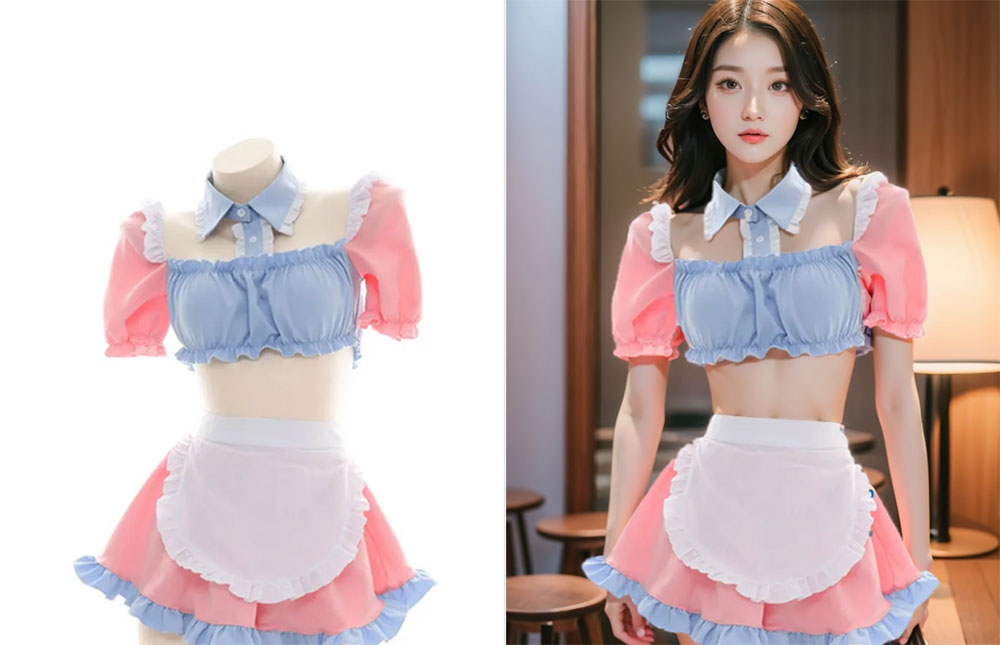
What Is an AI Fashion Model Generator?
It is a product photography shortcut. The AI fashion model generator takes a garment image and generates a realistic model wearing it in a studio-style scene. The AI preserves the garment design — print, color, cut and trims — while adding believable body proportions, drape, lighting and shadows.
For small brands and independent sellers, this replaces the most expensive part of listing a product. Instead of booking a shoot for every colorway, you photograph the item once and generate on-model visuals in minutes. The same workflow creates lookbook pages, marketplace images and social posts, all with a consistent visual style.
Core Features of the Fashion Model Generator
Garment Fidelity Kept
Print, color, stitching and trims stay true to the original product photo, so the listing still looks accurate.
Studio Lighting Built In
Soft studio light, natural shadows and clean highlights are generated automatically around the garment.
Pose and Scene Control
Choose a standing, walking or seated pose and set the backdrop, from seamless white to urban or editorial settings.
Catalog Consistency
Reuse one model and lighting recipe across products so your storefront looks like a single coordinated shoot.
Minutes Instead of Weeks
Skip scheduling, shipping samples and studio time — generate on-model images the same day you photograph the item.
Free, No Watermark
Every generated image is free, watermark-free and ready to upload to your store or marketplace listing.
How to Generate Fashion Model Photos (Step by Step)
You need one clean garment photo to start:
- Open the generator. Go to the AI fashion model generator page.
- Upload the garment image. Use a flat-lay, mannequin or product photo with the full item visible.
- Describe the model and scene. Mention pose, setting and mood, such as a studio white backdrop with a walking pose.
- Generate and review. Check that the print, color and cut match the product before publishing.
- Download and list. Save the watermark-free image and reuse the same recipe for other products.
Pro Tips for E-commerce Fashion Images
Better inputs and consistent prompts produce a more professional catalog:
- Photograph the garment flat and evenly lit. A straight-on shot with no shadows keeps the AI render faithful to the real product.
- Write one reusable prompt. Save the model and lighting description so every product in the catalog matches.
- Match the backdrop to your brand. Seamless white reads as marketplace-ready, while textured walls suit editorial lookbooks.
- Check details before publishing. Verify buttons, logos and stitching, especially on printed or patterned items.
- Keep a mix of image types. Pair on-model shots with flat-lays so customers see both styling and product detail.
Need a different starting point? The AI clothes to model tool is built for flat-lay photos, and the AI product mockup generator handles non-apparel products. Read the clothes to model guide for flat-lay workflows.
Frequently Asked Questions (FAQ)
Is the AI fashion model generator free?
Yes. The tool is free on AIDoImg with no watermark and no account required, so you can build a full lookbook without a budget.
What kind of garment photo works best?
A flat-lay, mannequin shot or clean product photo on a plain background works best. The garment should be fully visible, well lit and not heavily wrinkled.
Can I use the generated images for my online store?
The images are generated for you to use in product listings, marketplaces, ads and social media. Make sure the garment itself is your own product or one you are authorized to sell.
Will the model look consistent across my catalog?
You can reuse the same model description and lighting prompt for every garment, which keeps a catalog visually consistent.
Can I control the background and pose?
Yes. Describe the setting and stance you want, such as a plain studio backdrop with a walking pose, and the AI builds the scene around the garment.
Do I need any photography experience?
No. Upload a garment image, describe the model and scene, and generate. The AI handles lighting, proportions and fabric rendering.
