
It starts with your own photo
Upload a full-body or three-quarter photo of yourself — or of whoever will wear the outfit. The AI keeps that face, hair, skin tone and body exactly as they are.
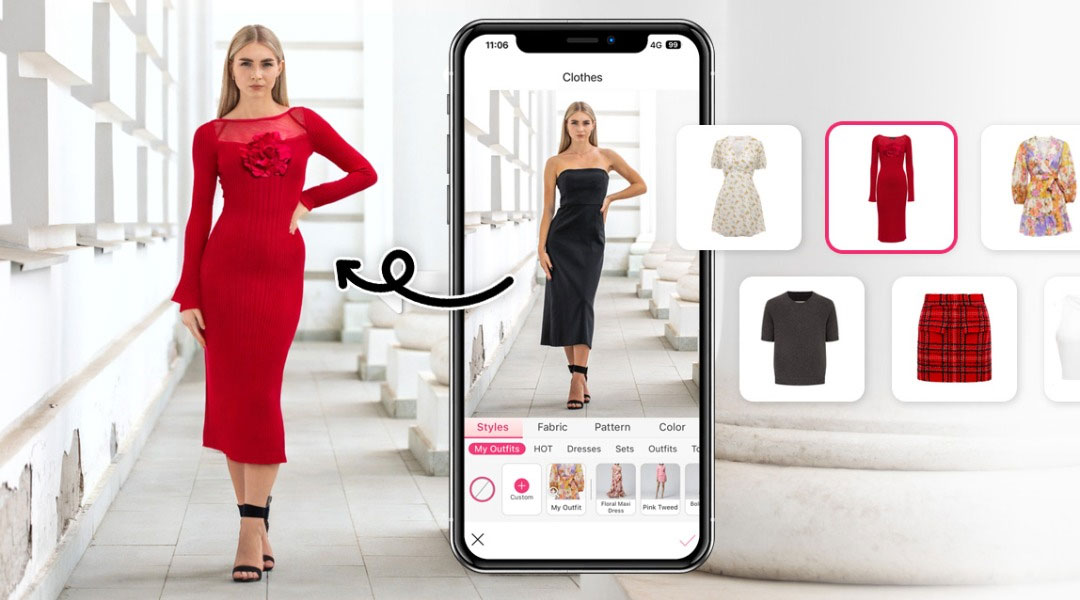
Try clothes on your own photo before you buy with a free AI virtual try-on. Upload a full-body photo of yourself and a photo of the outfit you are thinking about — the AI dresses your own face and body in it, with every fabric detail, print and logo kept intact. Pick a pose and a scene style, or let the AI decide. No fitting room, no real model, no photoshoot.
Drag & drop the garment you want to try on
or browse files — flat lay, mannequin, ghost mannequin or on-model • JPG, PNG, WEBP • max 10MB
No garment? Try one of these:
Drag & drop your own full-body photo here
or browse files — the person whose face and body you want to keep • JPG, PNG, WEBP • max 10MB
By using this tool you agree to our Terms of Service and Privacy Policy.
Your try-on preview will appear here
Upload the outfit and a photo of yourself on the left, then click Try On Outfit. Pose and style are optional.
Trying the outfit on your photo…
This usually takes 10–60 seconds. Please keep this page open.
Oops, something went wrong
 AI Clothes Changer
 AI Outfit Changer
 AI Lingerie Try-On
 AI Xray Clothes
 AI Virtual Model Generator
 AI Pose Generator
 AI Image Generator
 AI Image Editor
 AI Body Modifier
 AI Baby Generator
 AI Age Changer
 AI Pregnant Generator
 AI Gender Swap
 AI Object Remover
 AI Watermark Remover
 AI Background Remover
 AI Background Changer
 AI Photo Restoration
 AI Image Extender
 AI Image Enhancer
 AI Image Upscaler
 AI Image Style Converter
 AI Sticker Generator
 AI Headshot Generator
An AI virtual try-on is an online fitting room: your own photo plus a garment photo, and the outfit appears on your own body — before you buy.
Upload a full-body or three-quarter photo of yourself — or of whoever will wear the outfit. The AI keeps that face, hair, skin tone and body exactly as they are.
Upload the piece or the full outfit you are considering: a flat lay, a ghost mannequin, a product image from a shop page or an existing on-model photo.
Unlike a model generator, the person never changes here. The AI only changes the clothes, so what you see is how that outfit reads on your own height and proportions.
A studio-quality try-on preview generated online in 10–60 seconds. Pick a pose and a scene style first, or let the AI choose, then download the result free without a watermark.
One free AI virtual try-on in your browser — your own photo, any garment and a complete look in seconds, at zero cost.
This is the difference from a model generator: the person in the result is you. Height, proportions and skin tone are preserved, so the preview tells you something a stock model cannot.
Our AI virtual try-on fits the outfit onto a real body, matching proportions, lighting and shadows so the preview looks like a photo taken in a fitting room.
Fabric texture, stitching, colour, print and logos stay true to your original photo — the AI dresses you in that garment, not a lookalike.
Paste a product photo from any store and see the length, proportion, colour and styling on your own body — fewer returns and fewer surprises.
Style every try-on with twelve fashion poses and eighteen studio, editorial, lookbook and lifestyle scenes — or leave them empty and let the AI decide.
Use this free AI virtual try-on without an account, download clean results with no watermark, and get even more daily generations as a member or VIP.
Try an outfit on your own photo in four simple steps. No editing skills, no design software and no account needed — upload the clothes, add your photo and go.
Add the piece you want to try: a flat lay, a ghost mannequin shot, a product image from a shop page or an existing on-model photo.
Upload a full-body photo of yourself, or pick one of fifteen preset models if you only want to see the look. Your photo is what keeps you in the result.
Optionally pick one of twelve poses and eighteen scene styles, describe the look in your own words and choose an output size that fits where you will use it.
Click Try On Outfit, check the preview and download it instantly with no watermark — then swap only the garment to try the next piece on the same body.
From a single shopping decision to a whole content plan, here is what people use an AI virtual try-on for.
Try an item from any online store on your own photo and judge the length, proportion and colour before you check out.
See whether a colourway, print or texture works with your skin tone and wardrobe before ordering it in the wrong variant.
Try a full outfit, not just one piece, and see how tops, bottoms and outerwear read together on your own body.
Sellers try a piece on their own photo and publish the result next to the listing so buyers see it on a real body.
Turn a product photo into a try-on post, a comparison or a styling video cover with a familiar face your audience knows.
Upload a friend's or a client's photo with their permission and preview an outfit for an event before they commit to it.
Shoppers, stylists and creators use this free AI virtual try-on every day to see an outfit on their own body before deciding.
“I try the dress on my own photo before checking out now. Two returns avoided in one month, and the length looked exactly right.”
“I test a piece on my client's own photo before a fitting. Her face and body stay identical while the outfit changes.”
“Free, no sign-up and no watermark. I tried a jacket from a shop page on my own photo in under a minute.”
“Customers ask how a piece looks on a real body, so I try it on my own photo and post the result with the listing.”
“I check how a print sits on my own body before I order a sample. The colours and stitching came out exactly as designed.”
“I put my own photo in and switch garments to see how a silhouette reads on a real body before I sew anything.”
Answers to the most common questions about our free online AI virtual try-on tool.
An AI virtual try-on is an online fitting room. You upload a full-body photo of yourself and a photo of the garment you are thinking about, and the AI shows that outfit on your own face and body — so you can judge the look before you buy.
Upload your full-body photo in Step 2, upload the garment photo in Step 1, then click Try On Outfit. The AI keeps your face, hair, skin tone and body exactly as they are and dresses that body in the garment, with natural fabric drape, matching lighting and contact shadows.
A sharp, evenly lit, full-body or three-quarter shot works best, with your arms and legs visible and a plain background. Avoid heavy filters, cropped shoulders or a photo where the existing outfit hides your silhouette — JPG, PNG or WEBP up to 10MB.
A flat lay, a table shot, a ghost mannequin, a product image from a shop page or an existing on-model photo all work. Use a sharp image with the whole garment visible and as little clutter as possible.
Yes — that is exactly what this page is for. Paste a product photo from any store, try it on your own photo, and check the length, proportion, colour and styling before you pay.
Yes. Upload a garment that already shows the full outfit, such as a dress, a suit or a styled product shot, and the AI reproduces the complete look on your body. A single top, bottom, jacket or outerwear piece works too.
Twelve poses are available: 3/4 turn, adjusting clothing, back view, crossed arms, hand in pocket, over-the-shoulder, playful spin, power stance, seated casual, standing, walking forward and a random pose chosen by the AI.
Eighteen styles, including E-Commerce, White Studio, Catalog, Editorial, Lookbook, Street Style, Campaign, Runway, Dark Studio, Lifestyle, Beauty, Couture, Resort, Evening, Sportswear, Denim, Vintage and Film. The style sets the environment, lighting and mood only — the outfit never changes.
Yes, it is free and you can try clothes on your own photo without an account and download the results without a watermark. A free member account increases your daily generations, and VIP adds unlimited daily use and every exclusive feature.
Uploaded photos are only used to generate your try-on result. Use only photos you own or have permission to use, and do not upload images of other people without their consent. You may use the results commercially provided you comply with our Terms of Service.
