AI Fashion Model Generator Free Online

Step 1 · Upload the outfit photo * 0 / 1

Drag & drop the outfit you want photographed

or browse files — flat lay, mannequin, ghost mannequin or on-model • JPG, PNG, WEBP • max 10MB

No outfit photo? Try one of these:

Step 2 · Select model (optional)
Step 3 · Upload a custom model (optional) 0 / 1

Drag & drop your own model photo here

or browse files — the person whose face and body you want to keep • JPG, PNG, WEBP • max 10MB

Step 4 · Select pose (optional)
Step 5 · Select style (optional)
Step 6 · Describe your model (optional)
Step 7 · Choose image size 1:1 1024x1024

By using this tool you agree to our Terms of Service and Privacy Policy.

Result

AI Fashion Model Generator
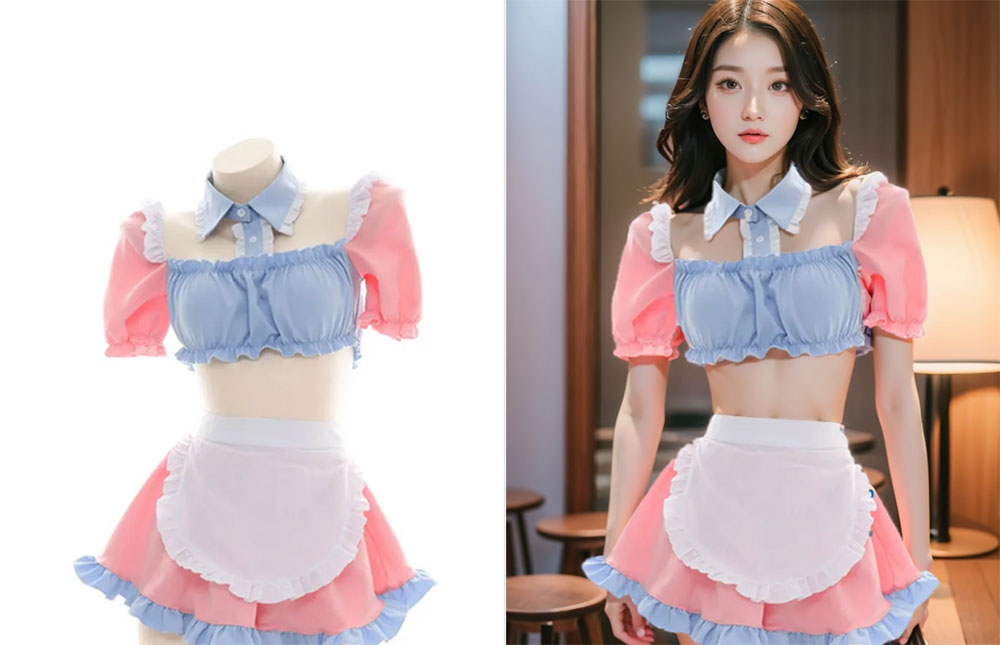
AI generated fashion model photo example

Your fashion model photo will appear here

Upload one outfit photo on the left, then click Generate Fashion Model. Model, pose and scene style are optional.

Don't Miss Out! These Free AI Tools Are Amazing

What Is an AI Fashion Model Generator?

An AI fashion model generator turns one outfit photo into a finished fashion image — a professional model, a pose and a styled scene, without a real shoot.

It builds a fashion look, not just a cutout

An AI fashion model generator reads the outfit in your photo and renders a photorealistic fashion photograph around it. Upload a flat lay, a mannequin shot or a product image, and the AI creates the model, the fit, the pose and the styling that make the piece look like a fashion editorial.

What you upload

One outfit photo is all it takes: a flat lay, a ghost mannequin, a product shot or an on-model image. You can also add an optional reference photo of a person whose face and body you want the AI to keep.

What stays the same

The outfit is preserved exactly. Fabric texture, colour, print, stitching, buttons and logos stay true to your photo — the AI only changes the model, the pose and the fashion scene around it.

What you get in seconds

A fashion-quality model photo generated online in 10–60 seconds. Pick a fashion model, a pose and a scene style first, or let the AI choose, then download the result free without a watermark.

Why Choose Our Free AI Fashion Model Generator

One free AI fashion model generator in your browser — turn outfit photos into editorial-grade fashion images and download them at zero cost.

Photorealistic fashion models

Our AI fashion model generator renders a lifelike person around your outfit, matching body proportions, skin tone, lighting and shadows so the result looks like a real fashion shoot.

Outfit details kept exact

Fabric texture, stitching, colour, print and logos stay true to your original photo — the AI builds the fashion look around the clothes, not the other way round.

Fifteen preset fashion models

Choose from fifteen diverse preset fashion models — different faces, hair, skin tones and body types — or upload your own model photo and keep that exact person.

Twelve poses & eighteen fashion scenes

Style every shot with twelve fashion poses and eighteen studio, editorial, lookbook and lifestyle scenes — or leave them empty and let the AI decide.

Free, no sign-up, no watermark

Use this free AI fashion model generator without an account, download clean results with no watermark, and get even more daily generations as a member or VIP.

Fast, secure & private

Photos are compressed in your browser, uploaded securely and returned in 10–60 seconds on average — no design skills or software needed.

How to Use the Free AI Fashion Model Generator

Create a fashion model photo in four simple steps. No editing skills, no design software and no account needed — just upload the outfit and pick a look.

  1. 1

    Upload the outfit photo

    Add the piece you want photographed on a model: a flat lay, a ghost mannequin shot, a product image or an existing on-model photo.

  2. 2

    Pick a fashion model, pose & scene

    Choose one of fifteen preset fashion models, twelve poses and eighteen scene styles — or skip them and let the AI choose for you.

  3. 3

    Describe & set the size

    Optionally describe the fashion look in your own words and pick an output size that fits your store, ad or social channel.

  4. 4

    Generate & download free

    Click Generate Fashion Model, preview the fashion shot and download it instantly with no watermark — then try another model with the same outfit.

What You Can Do With an AI Fashion Model Generator

From a single product shot to a full seasonal campaign, here is what people generate fashion model photos for.

Turn flat-lays into fashion photos

Put an outfit photo on a styled model and use the result for listings, ads and marketplace catalogs.

Build a lookbook without a shoot

Generate editorial, lookbook and campaign scenes around the same outfit — no photographer, studio or model booking.

Compare looks and colorways

Render the same outfit in different poses and fashion scenes to see which visual direction sells it best.

Create daily social content

Produce fresh fashion visuals from one product photo and turn them into posts, reels covers and moodboards.

Keep your own brand model

Upload a photo of your brand model once and keep that exact face and body while changing outfits, poses and scenes.

Test fabric and print quickly

Check how a print, texture or logo reads on a real body in fashion lighting before you commit to production.

What Users Say About Our AI Fashion Model Generator

Online stores, stylists and creators use this free AI fashion model generator every day to turn outfit photos into fashion visuals.

“We replaced the studio shoot for our seasonal catalog. Flat-lay photos go in and the fashion model generator returns clean looks for every SKU in minutes.”
DK Daniel K. E-commerce manager
“Picking the model, the pose and the scene separately is exactly how I brief a fashion shoot. The outfit stays identical every single time.”
SM Sofia M. Fashion stylist
“Free, no sign-up and no watermark. I generated a dozen fashion frames from one jacket photo for a styling post.”
LT Liam T. Content creator
“I run a small clothing store. Fashion photos used to mean a photographer and a model; now I generate the whole lookbook myself before a launch.”
PN Priya N. Small business owner
“My mockups finally look like real fashion photography. The print, colors and stitching stay exactly as designed, which is what my customers check first.”
MD Marcus D. Print-on-demand seller
“I test how a silhouette reads on different body types before I sew anything. Describing the fashion look in the prompt works surprisingly well.”
HK Hana K. Fashion design student

Frequently Asked Questions(FAQ)

Answers to the most common questions about our free online AI fashion model generator.

What is an AI fashion model generator?

An AI fashion model generator creates a fashion photograph around a piece of clothing you already own. You upload one outfit photo, and the AI builds a professional model, a pose and a fashion scene around it, so the result looks like a real shoot instead of a product shot on a hanger.

How do I generate a fashion model photo?

Upload the outfit photo, optionally choose a preset fashion model, a pose and a scene style, then click Generate Fashion Model. The AI analyses the garment, fits it onto the model with natural fabric drape and renders the final fashion shot with matching lighting, shadows and background.

What kind of clothing photo should I upload?

Flat lay, table shot, mannequin, ghost mannequin or an existing on-model photo all work. Use a sharp, evenly lit image with the whole outfit visible and as little clutter as possible — JPG, PNG or WEBP up to 10MB.

Can I choose which fashion model appears?

Yes. Pick one of fifteen preset fashion models with different genders, ages, body types and ethnicities, or leave the gallery empty and the AI creates a random professional model that suits the outfit.

Can I upload my own model photo?

Yes. Upload a photo of the person whose face and body you want to keep. The AI preserves that person and dresses them in your uploaded outfit, ignoring the clothes they are wearing in the reference photo.

Which poses can I use for the fashion shot?

Twelve poses are available: 3/4 turn, adjusting clothing, back view, crossed arms, hand in pocket, over-the-shoulder, playful spin, power stance, seated casual, standing, walking forward and a random pose chosen by the AI.

Which fashion scene styles are available?

Eighteen styles, including E-Commerce, White Studio, Catalog, Editorial, Lookbook, Street Style, Campaign, Runway, Dark Studio, Lifestyle, Beauty, Couture, Resort, Evening, Sportswear, Denim, Vintage and Film. The style sets the environment, lighting and mood only — the outfit never changes.

Can I describe the fashion look in my own words?

Yes. Use the optional prompt box to describe gender, age, body type, hair, skin tone, expression or styling, for example "female, mid-20s, tall and slim, long dark hair, warm skin tone". The AI follows your description.

Is the AI fashion model generator free? Do I need to sign up?

Yes, it is free and you can generate fashion model photos without an account and download them without a watermark. A free member account increases your daily generations, and VIP adds unlimited daily use and every exclusive feature.

Are the generated fashion photos realistic and can I use them commercially?

The results are photorealistic: correct body proportions, natural fabric drape and consistent lighting and shadows, so they are ready for product listings, lookbooks, ad creative and social posts. You may use them commercially provided you own the rights to the uploaded images and comply with our Terms of Service.