
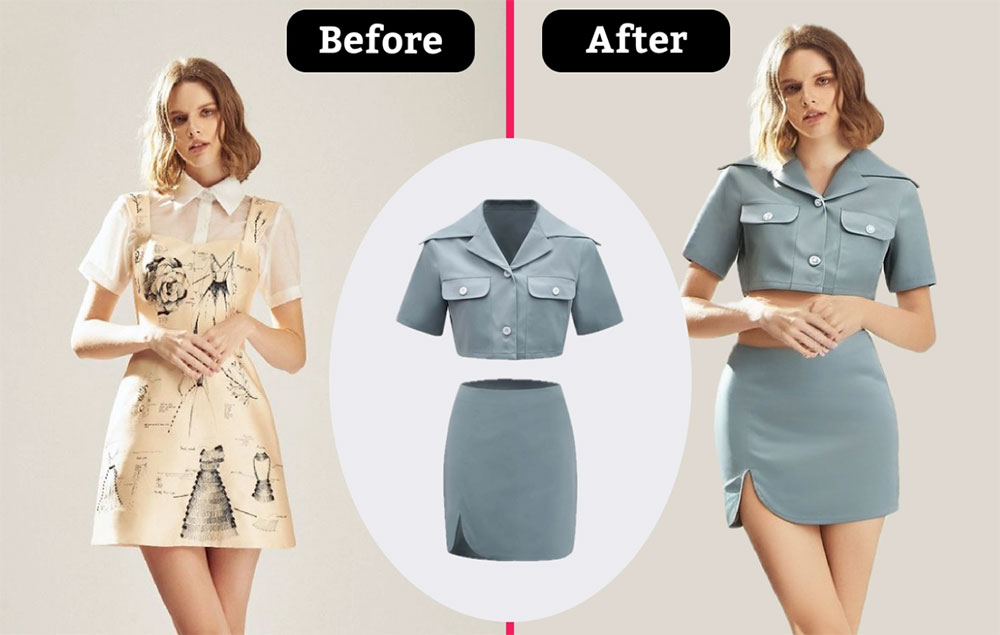
What Is AI Garment Try-On?
AI garment try-on is the bridge between a product photo and a body. You provide a garment image and a model photo, and the AI wraps the item onto that body, respecting the pose, scale and light of the original picture. Fabric folds, hems and shoulder lines are reconstructed rather than pasted, which is why the result looks photographed instead of composited.
It is the fastest way to answer fit questions before production or purchase: how does this length sit, does the sleeve hit the wrist, is the silhouette relaxed or boxy. Studios use it for lookbooks, sellers use it to preview samples, and shoppers use it to judge whether a piece will work on their frame.
Core Features of the Garment Try-On Tool
Any Garment, One Click
Tops, dresses, jackets, knitwear, skirts and trousers all fit into the same simple workflow.
Realistic Drape and Proportion
The AI rebuilds how fabric falls on the body, so boxy, fitted and oversized cuts all read correctly.
Bring Your Own Model
Use an existing model or mannequin photo so the preview matches the body type and stance you already work with.
True Product Colors
Color, pattern and print are carried over from your garment photo for honest, listing-ready visuals.
Seconds per Preview
Generate several garment and model combinations in the time it takes to write a product description.
Free and Watermark-Free
No subscription and no watermark, so previews can go straight into a listing or deck.
How to Use AI Garment Try-On (Step by Step)
Two images are enough to produce a preview:
- Open the try-on tool. Go to the AI garment try-on page.
- Upload the garment photo. A clean shot of the item on a plain background gives the most faithful result.
- Upload or choose a model photo. Use your own model image or let the tool place it on a standard figure.
- Generate the preview. The AI fits the garment to the pose and lighting of the model photo.
- Download the result. Save the watermark-free image and repeat for other colorways.
Pro Tips for Accurate Garment Previews
These habits keep previews honest and consistent:
- Shoot the garment straight-on. Angled or folded product photos make the AI guess at the true cut.
- Avoid heavy wrinkles and clips. Steam or smooth the item so folds in the render come from the body, not the packing.
- Keep the model pose neutral. A simple standing pose with visible shoulders and arms produces the cleanest fit.
- Match lighting temperature. Warm studio light on a cool model photo will look off, so pick images with similar tones.
- Verify pattern placement. On large prints, check that the motif lands sensibly across the chest and seams.
Building a full lookbook? The AI fashion model generator creates complete studio scenes, and the AI model try-on fits whole outfits rather than single pieces. Read our fashion model generator guide for catalog workflows.
Frequently Asked Questions (FAQ)
Is AI garment try-on free?
Yes. The tool is free on AIDoImg with no watermark and no account required, so you can preview as many garments as you need.
Which garment types are supported?
Tops, shirts, blouses, jackets, coats, dresses, skirts, trousers and knitwear all work. Highly structured items such as heavily padded outerwear preview best with clear product photos.
Can I use my own model photo?
Yes. Upload a model or mannequin photo and the AI fits the garment to that body and pose, keeping the lighting of the original image.
Will prints and logos stay accurate?
Yes. The AI follows the source garment for print, color and trims. Check fine details such as small logos before publishing an image.
How fast is a garment preview?
Usually a few seconds per image. Upload the garment and a model photo, generate, and download the result immediately.
Can I use the images commercially?
You can use generated images for your own product listings and marketing, provided you own or are authorized to sell the garment shown.
