
It changes the hair, not the person
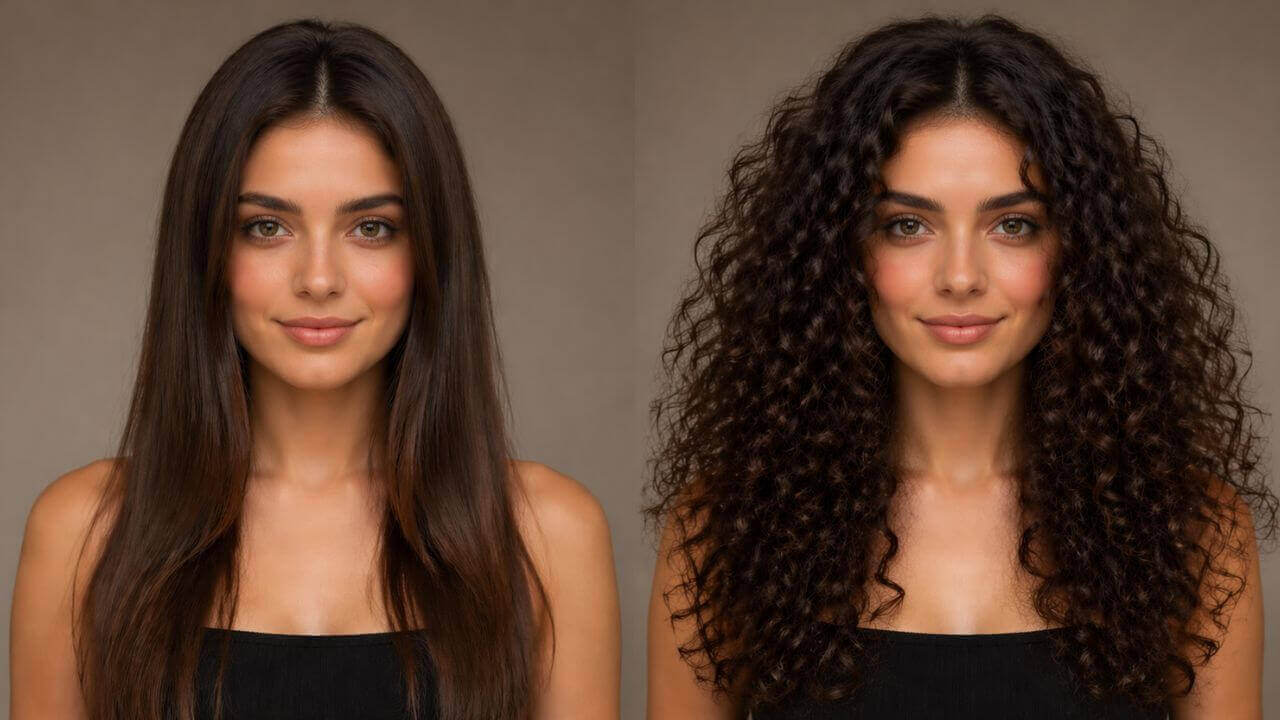
An AI hairstyle changer redraws only the hair on your head. Upload one portrait, pick a style, and the AI renders a new haircut with realistic strands, volume and shine while your face stays untouched.
Upload one photo and preview dozens of hairstyles and hair colors in seconds with a free AI hairstyle changer. Bob, short, long, layers, bangs, curly or a high ponytail — plus natural and fashion colors, all rendered on your own face while your features and background stay exactly the same. No sign-up, no watermark.
Drag & drop your photo here
or browse files — JPG, PNG, WEBP • max 10MB
No image? Try one of these:
By using this tool you agree to our Terms of Service and Privacy Policy.
Your new hairstyle will appear here
Upload a photo, pick a hairstyle, hair color and view angle, then click Generate Hairstyle.
Changing your hairstyle…
This usually takes 10–60 seconds. Please keep this page open.
Oops, something went wrong
 AI Clothes Changer
 AI Outfit Changer
 AI Lingerie Try-On
 AI Xray Clothes
 AI Virtual Model Generator
 AI Pose Generator
 AI Image Generator
 AI Image Editor
 AI Body Modifier
 AI Baby Generator
 AI Age Changer
 AI Pregnant Generator
 AI Gender Swap
 AI Object Remover
 AI Watermark Remover
 AI Background Remover
 AI Background Changer
 AI Photo Restoration
 AI Image Extender
 AI Image Enhancer
 AI Image Upscaler
 AI Image Style Converter
 AI Sticker Generator
 AI Headshot Generator
An AI hairstyle changer is an online tool that restyles the hair in a photo — no salon visit, no wig and no Photoshop.
An AI hairstyle changer redraws only the hair on your head. Upload one portrait, pick a style, and the AI renders a new haircut with realistic strands, volume and shine while your face stays untouched.
One clear, well-lit photo is all it takes — ideally a front-facing portrait where your hair is fully visible and not covered by a hat, hood or sunglasses.
Only the hair is replaced. Your face, facial features, skin tone, body, clothes, pose and background remain exactly as they were, so the result still looks like your original photo.
A photorealistic hairstyle preview generated online in 10–60 seconds. Try another cut or color, then download the result free — no watermark, no account and nothing to install.
One free AI hairstyle changer in your browser — try on new haircuts and hair colors on your own photo and download the result at zero cost.
Bob, Short, Long, Layered, Bangs, No Bangs, Curly, Straight, Wavy, Pixie, Ponytail and Bun — preview any cut on your own face without waiting for an appointment.
Black, Brown, Blonde, Red, Pink, Blue, Purple and Silver. Mix any color with any hairstyle and see the result with realistic shine and highlights.
Choose the angle you want to see the new hairstyle from, so you can judge a cut from the same side your stylist will be working on.
Only the hair changes. Your facial features, skin tone, expression, body, clothes and background stay untouched, so the preview is really you.
The AI matches strand texture, volume and lighting to your original photo, so the new haircut blends naturally with your hairline and face shape.
Use this free AI hairstyle changer without an account, download clean results with no watermark, and get even more daily generations as a member or VIP.
Try on a new hairstyle in four simple steps. No editing skills, no design software and no account needed — just upload and preview your new look.
Choose a clear, well-lit, front-facing portrait where your hair is fully visible — this gives the most realistic hairstyle preview.
Choose one of twelve hairstyles and eight hair colors, then select the view angle you want to see the result from.
Optionally add a custom prompt such as "short bob with pink highlights" or fine-tune the output size for your post or print.
Click Generate Hairstyle, preview the AI result and download it instantly with no watermark — then try another cut on the same photo.
From choosing your next haircut to previewing a whole new color, here is what people use a virtual hairstyle try-on for.
Preview a bob, pixie or layered cut on your own photo before you sit in the chair, so you know what actually suits your face shape.
See yourself with blonde, red, pink or silver hair before committing to dye — no bleach, no regrets and no salon bill.
Stylists show clients a realistic preview of a proposed cut or color, which makes the consultation clearer and the result more predictable.
Generate hairstyle transitions for reels, thumbnails and before-after comparisons from a single selfie.
Match a character’s hair length, style and color on your own face for cosplay planning and costume tests.
Compare updos, ponytails and buns with your dress and makeup long before the big day, and share the preview with your stylist.
Clients, stylists and creators use this free AI hairstyle changer every day to preview cuts and hair colors.
“I tried five different bobs on my own photo before my salon appointment. The AI kept my face exactly the same, so I knew what would actually suit me.”
“I show clients a short or layered version of their own photo during the consultation. It saves a lot of guessing and they love seeing the result first.”
“The color options are what I use most. Pink, blue and silver previews look natural instead of flat, and the download has no watermark.”
“I made a whole reel of hairstyle transitions from one selfie. Fast, free and I did not even need to sign up.”
“My stylists use it for before-and-after mockups. Layered, bangs and ponytail all render cleanly, and the front and side views help a lot.”
“I previewed bridal updos and hair colors months before the wedding. It made the decision with my stylist so much easier.”
Answers to the most common questions about our free online AI hairstyle changer.
A free AI hairstyle changer is an online tool that restyles the hair in your photo in seconds. Upload one portrait, pick a hairstyle and hair color, and the AI renders a new haircut on the same person, with no salon visit, no Photoshop and no account needed.
Upload a clear photo of your face, choose a hairstyle, a hair color and a view angle, then click Generate Hairstyle. The AI detects your head, face and existing hair, then renders the new haircut with realistic strand detail while keeping your face and body unchanged.
Twelve built-in styles are available: Bob, Short, Long, Layered, Bangs, No Bangs, Curly, Straight, Wavy, Pixie, Ponytail and Bun. You can also describe any other style you want in the custom prompt field.
Yes. Choose from eight colors — Black, Brown, Blonde, Red, Pink, Blue, Purple and Silver — and combine any color with any hairstyle. Natural tones and trendy fashion colors all render with realistic hair shine.
Front, Side, Back and Top tell the AI which angle the new hairstyle should be shown from. Front is the default and works for most selfies; side, back and top are useful when you want to see how a haircut looks from another direction.
No. The AI hairstyle changer only redraws the hair. Your face, facial features, skin tone, body, clothes and background stay exactly as they were in the original photo.
You can upload JPG, PNG or WEBP images up to 10MB. The output keeps the proportions of your upload, rendered in the closest preset size for the sharpest result.
Most hairstyle previews finish in 10 to 60 seconds depending on image size and queue load. Keep the page open while the result is being generated.
Yes, it is free and you can try on a new hairstyle without an account and download the result without a watermark. A free member account increases your daily generations, and VIP adds unlimited daily use, more advanced AI models and every exclusive feature.
You may use results for personal and commercial previews, provided you own the rights to the uploaded images and your use complies with our Terms of Service.
