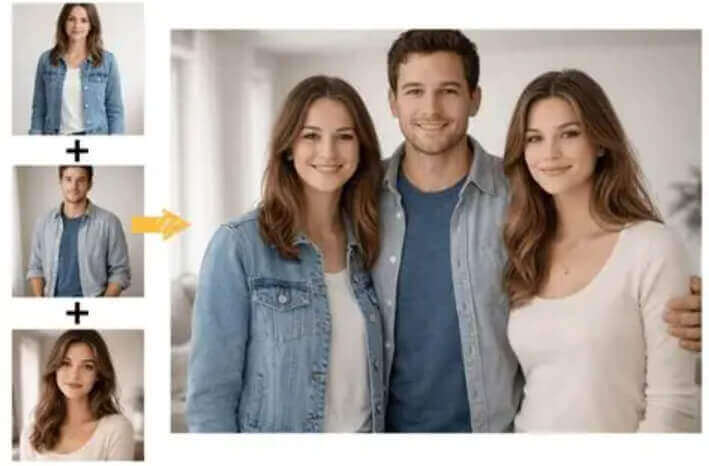
Free AI Group Photo Generator

Upload a photo of Person 1 0 / 1

Drag & drop Person 1's photo here

or browse files — JPG, PNG, WEBP • max 10MB

People in this photo

No image? Try one of these:

Upload a photo of Person 2 0 / 1

Drag & drop Person 2's photo here

or browse files — JPG, PNG, WEBP • max 10MB

People in this photo

No image? Try one of these:

Upload a photo of Person 3 (optional) 0 / 1

Drag & drop Person 3's photo here

or browse files — JPG, PNG, WEBP • max 10MB

People in this photo

No image? Try one of these:

Choose a group photo scene Family Portrait

Pick the background for your group photo — the AI places everyone in that scene with unified lighting and style.

Custom prompt (optional)
Choose image size 4:3 1024x768

By using this tool you agree to our Terms of Service and Privacy Policy.

Result

AI Group Photo Generator
AI group photo generator example result

Your group photo will appear here

Upload photos of up to 3 people, pick a scene, then click Generate Group Photo.

Don't Miss Out! These Free AI Tools Are Amazing

What is a Free AI Group Photo Generator?

An AI group photo generator combines photos of different people into one realistic group photo — no photo studio, no photographer and no scheduling everyone together.

It builds one photo from separate photos

Upload one photo per person and the AI places everyone together in a single composition. Lighting, skin tone, head size and shadows are unified, so it looks like one photo taken together instead of a cut-and-paste collage.

What you upload

Up to three photos — one per person or per group. Each photo can contain one person, a couple or a small family; just tell the tool how many people are in it. JPG, PNG or WEBP up to 10MB.

What stays the same

Every face stays exactly as uploaded. The AI keeps facial features, skin tone, hairstyle and body, and never swaps, blends or replaces a face — nobody gets a stranger's face in the group photo.

What you get in seconds

A photorealistic group photo rendered online in 10–60 seconds. Preview the result, try another scene and download it free — no watermark, no account and nothing to install.

Why Choose Our Free AI Group Photo Maker

One free AI group photo generator in your browser — merge photos of up to 3 people into one realistic shot and download it at zero cost.

Every face preserved

The AI keeps every face exactly as uploaded — no blurry faces, no face swapping and no strangers appearing in your group photo.

Unified lighting

Skin tones, head proportions, shadows and light direction are unified, so it looks like one photo taken together instead of separate shots.

20+ group scenes

Family portrait, graduation, office team, beach trip, concert, Christmas party and many more backgrounds — pick one and the AI places everyone in it.

Up to 3 photos and 6 people each

Merge 2 or 3 photos into one group photo. Each photo may itself contain a couple or a small group, and the people-count selector keeps the head count exact.

Custom prompt

Describe the mood, outfits or details you want, such as "everyone laughing naturally" or "smart casual outfits", and the AI applies it to the whole group.

Free, no sign-up, no watermark

Use this free AI group photo generator without an account, download clean results with no watermark, and get even more daily generations as a member or VIP.

How to Use the Free AI Group Photo Generator

Combine photos into one group photo in four simple steps. No editing skills, no Photoshop and no account needed — just upload, pick a scene and generate.

  1. 1

    Upload each person photo

    Add up to three photos of the people you want in the group photo and tell the tool how many people are in each one, so the AI counts everybody correctly.

  2. 2

    Pick a group photo scene

    Choose from 20 scenes such as Family Portrait, Graduation Day, Office Team, Beach Vacation or Christmas Party for the background and mood.

  3. 3

    Choose size & prompt

    Select an output size and optionally describe the outfits, mood or details you want, such as "everyone laughing naturally in smart casual clothes".

  4. 4

    Generate & download free

    Click Generate Group Photo, preview the realistic AI result and download it instantly with no watermark — then reuse it for another scene.

What You Can Do With the AI Group Photo Maker

From one family portrait to a whole team shot, here is what people merge photos into a group photo for.

Family portraits far apart

Combine photos of family members who live in different cities into one warm family portrait — no flights and no studio booking.

Team & office photos

Merge individual headshots or remote team photos into one professional office team picture for your website and LinkedIn page.

Graduation & class photos

Recreate a class photo or a graduation day shot with friends who studied online or could not attend the ceremony.

Friends reunited in one shot

Put your friend group back together in a park, cafe or party scene even when everyone lives in a different country.

Wedding party & bridal crew

Build a wedding party photo with bridesmaids, groomsmen and family members from separate photos in matching outfits.

Holiday cards & celebrations

Create Christmas, New Year or birthday group photos for cards, albums, frames and social posts in seconds.

What Users Say About Our AI Group Photo Generator

Families, teams and friend groups use this free AI group photo maker every day to bring everyone into one picture.

“My grandparents live in another country, so we never had one photo of the whole family. I uploaded three photos, chose Family Portrait, and now it hangs in our living room.”
MR Maya R. Family organizer
“Half of my team works remotely. I mixed their photos into one Office Team shot for our annual report and nobody could tell it was never taken in the same room.”
KL Kevin L. Team lead
“Clients often want a group shot without gathering everyone. The scene presets and the people-count selector give me control over the head count and the lighting.”
AP Ana P. Event planner
“I use it for concept previews before a real shoot. The faces stay accurate and the lighting is unified, which is exactly what a client needs to approve an idea.”
TH Tom H. Photographer
“Our class split up after graduation, so we made a Class Photo from our own selfies. It looks like the campus picture we never managed to take.”
PS Priya S. Student
“Creating holiday and celebration posts used to mean booking a shoot. Now I put two or three photos together, pick a scene and download the result in under a minute.”
LM Lucas M. Social media manager

Frequently Asked Questions(FAQ)

Answers to the most common questions about our free online AI group photo generator.

What is a free AI group photo generator?

A free AI group photo generator combines photos of different people into one realistic group photo. Instead of cutting and pasting faces into a collage, the AI places everyone in the same scene, unifies lighting, skin tone and head proportions, and keeps every face true to the uploaded photo.

How does the AI group photo mixer work?

Upload the photo of each person, tell the tool how many people are in each photo, pick a scene and click Generate Group Photo. The AI analyses every face, merges the groups into one composition and renders a single realistic photo where everyone appears together.

How many photos can I combine into one group photo?

You can mix up to 3 photos in one pass. Photo 1 and photo 2 are required and photo 3 is optional, so you can start with two people and add a third whenever you need. Each photo may itself contain a couple or a small group.

What does "people in this photo" mean?

It tells the AI how many people are in the photo you just uploaded. If your upload is a couple, choose 2; if it is a family portrait, choose 3, 4, 5 or 6. The final head count and the placement of everyone in the group photo depend on this setting, so it is required before generating.

Will the AI change or swap the faces?

No. Every face stays exactly as uploaded - the AI keeps the facial features, skin tone, hairstyle and body of each person. It does not swap, blend or replace faces, and does not add strangers to your group photo.

Can I choose the background or scene of the group photo?

Yes. Pick from 20 built-in scenes such as Family Portrait, Graduation Day, Office Team, Class Photo, Sports Team, Wedding Party, Beach Vacation, Christmas Party and Celebration Moment. You can also describe your own background, mood or outfits in the optional custom prompt.

Which image formats and sizes are supported?

You can upload JPG, PNG or WEBP images up to 10MB each. Results can be generated in eight sizes, including 1:1, 16:9, 9:16, 4:3, 3:4, 3:2 and 2:3.

How long does it take to create a group photo?

Most group photos finish in 10 to 60 seconds depending on the number of people, the output size and the queue load. Keep the page open while the AI is rendering the result.

Is the AI group photo generator free? Do I need to sign up?

Yes, it is free and you can create a group photo without an account and download the result without a watermark. A free member account increases your daily generations, and VIP adds unlimited daily use, more advanced AI models and every exclusive feature.

Can I use the generated group photo commercially?

You may use results for personal and commercial purposes, provided you own the rights to the uploaded photos and your use complies with our Terms of Service.