
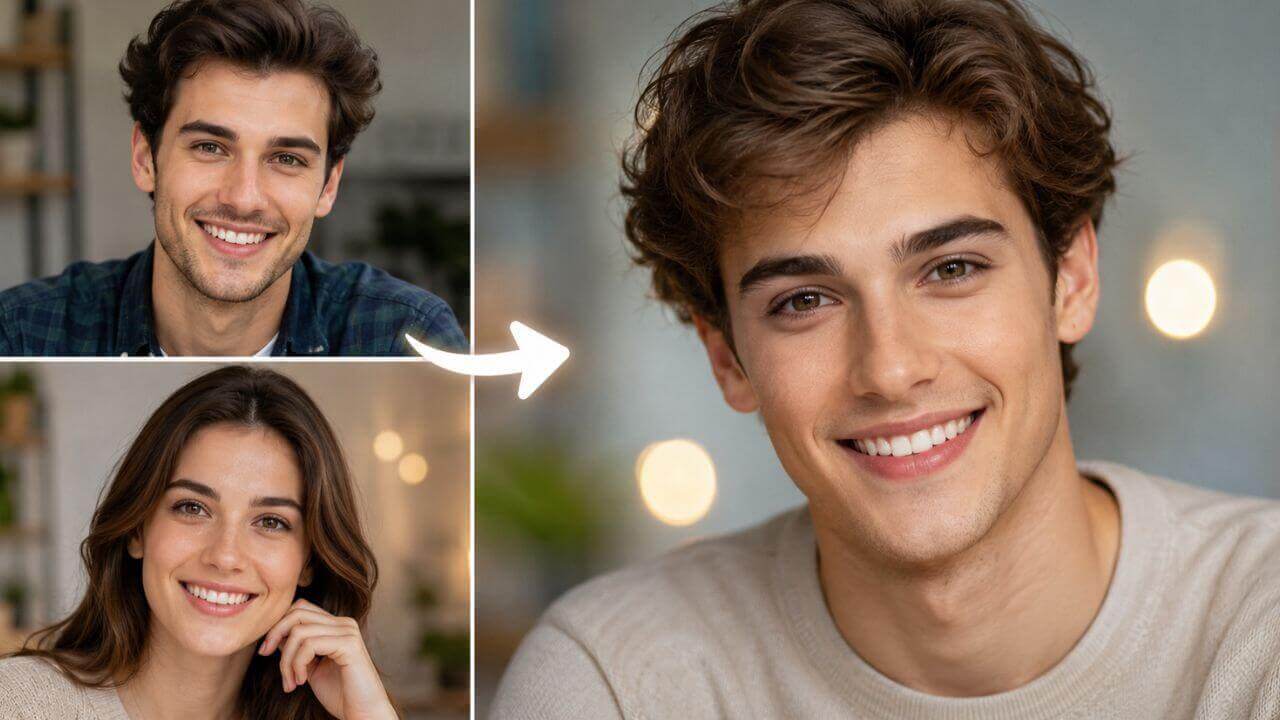
Two photos, one clean swap
The first photo (the base photo) supplies the body, pose, hairstyle, clothing and background. The second photo supplies only the face. The AI maps that face onto the head in the base photo and blends the edges naturally.
Upload a base photo and the face you want to use, and the AI swaps that face onto the person in seconds. Expressions, head pose, skin tone and lighting are kept from the original photo, so the result looks like a real photograph rather than a cut-and-paste. No sign-up, no watermark and 100% free.
Drag & drop the photo whose face will be replaced
or browse files — body, pose and background stay exactly the same
No image? Try this example:
Drag & drop the face you want to use
or browse files — a clear, front-facing headshot works best • JPG, PNG, WEBP • max 10MB
No image? Try this example:
By using this tool you agree to our Terms of Service and Privacy Policy.
Your face swap will appear here
Upload a base photo and a new face, then click Swap Face Now.
Swapping your face…
This usually takes 10–60 seconds. Please keep this page open.
Oops, something went wrong
 AI Clothes Changer
 AI Outfit Changer
 AI Lingerie Try-On
 AI Xray Clothes
 AI Virtual Model Generator
 AI Pose Generator
 AI Image Generator
 AI Image Editor
 AI Body Modifier
 AI Baby Generator
 AI Age Changer
 AI Pregnant Generator
 AI Gender Swap
 AI Object Remover
 AI Watermark Remover
 AI Background Remover
 AI Background Changer
 AI Photo Restoration
 AI Image Extender
 AI Image Enhancer
 AI Image Upscaler
 AI Image Style Converter
 AI Sticker Generator
 AI Headshot Generator
An AI face swap tool replaces the face in one photo with the face from another photo, blending the eyes, nose, mouth and skin tone so the result looks like a single real photograph.
The first photo (the base photo) supplies the body, pose, hairstyle, clothing and background. The second photo supplies only the face. The AI maps that face onto the head in the base photo and blends the edges naturally.
A sharp base photo where the face is visible, plus a clear front-facing headshot of the person whose face you want to use. JPG, PNG or WEBP, up to 10MB each.
Expressions, head pose, lighting, shadows, skin texture and reflections all come from the base photo, so the swapped face moves and looks the way the original photo does instead of looking pasted on.
A photorealistic face-swapped image generated online in 10–60 seconds. Preview it, download it free with no watermark, and keep swapping the same face onto other photos.
One free AI face swap tool in your browser — realistic results, no app install and no watermark.
The new face is scaled, rotated and colour-matched to the head in the base photo, so jawlines, neck shading and hair edges line up instead of looking pasted on.
Smiles, raised eyebrows and head tilt all come from the base photo, so the swapped face keeps the emotion of the original shot.
Shadows, highlights, reflections and skin texture are carried over from the original photo, which is what makes the swap read as a real photograph.
Only the face changes. Hair, clothing, hands, posture, props and the background all stay exactly as they were in the base photo.
Upload from your camera roll or drag and drop files on desktop. Images are compressed in the browser before upload, so large photos stay fast.
Use this free AI face swap tool without an account, download clean images with no watermark, and get even more daily swaps as a member or VIP.
A face swap takes three simple steps. No account, no editing skills and no software to install.
Add the photo whose face should be replaced. Choose a sharp, well-lit shot where the face is fully visible and not covered by hair, a hand or an object.
Add a clear, front-facing headshot of the person whose face you want to use — one person only, even lighting, no sunglasses, masks or strong filters.
Click Swap Face Now, preview the AI result, then download it instantly with no watermark. The face stays in your history so you can reuse it on other photos.
From funny edits to serious retouching previews, here is how people use free face swap images.
Put your face on a film poster, album cover or historical portrait and share the result as a short or story.
See how your face reads with a character costume or hairstyle before spending money on a shoot or a wig.
Create a framed print of a friend or family member in a funny or nostalgic role for a birthday or anniversary.
Show a client the concept of a face replacement quickly, then do the final fine retouching by hand.
Reuse one clean face on many base photos to build a consistent series of posts, thumbnails or avatars.
Swap a stand-in face onto a photo before publishing, so a real person is not identifiable in your mockups.
Creators, retouchers and marketers use this free AI face swap tool for quick, realistic face replacements.
“I swap my face into movie posters and album covers for shorts. The skin tone and lighting match so well that people assume I actually shot them.”
“We run face swap campaigns for clients. Uploading the base photo and one clean headshot gives us a usable image in under a minute.”
“For quick previews it saves me hours of manual compositing. I use it to show clients the concept, then do the final polish myself.”
“I put my face on costume references before commissioning a shoot. Expressions stay exactly as in my photo, which is what other tools get wrong.”
“Made a framed print of my dad as a vintage pilot for his birthday. Twenty seconds to generate and the download had no watermark.”
“We tested it before buying a whole retouching workflow. It handled tricky side lighting on the base photo better than expected.”
Answers to the most common questions about our free online AI face swap tool.
It is an online tool that replaces the face in one photo with the face from another photo. Upload a base photo and a clear photo of the face you want to use, and the AI blends that face onto the person in the base photo in seconds - no Photoshop, no app install and no account needed.
The AI detects the head and face in both photos, then maps the eyes, nose, mouth, jawline and skin tone of the new face onto the head in the base photo. It matches the original head pose, expression, lighting, shadows and skin texture so the result looks like a single real photograph instead of two images blended together.
Use the photo whose face you want to replace. The base photo keeps its body, pose, hairstyle, clothing, hands and background - only the face changes. A sharp, well-lit photo where the face is clearly visible and not covered by a hand or hair gives the cleanest result.
A clear, front-facing close-up of a single person works best: full face visible, neutral or natural expression, even lighting, no sunglasses, masks, heavy shadows or strong filters. Avoid group photos or faces turned far to the side, because the AI needs to see the whole face to map it accurately.
Yes. The final photo keeps the head pose, facial expression and emotion of the base photo, and the new face is blended with the original skin tone, lighting, shadows and reflections so nothing looks pasted on.
No. The result keeps the composition and framing of your base photo, so portraits stay portraits and landscape shots stay landscape. Very large photos are automatically scaled down to the model input limit before generation to keep processing fast.
Yes. Generate as many face swaps as you like - reuse the same new face on different base photos, for example to put the same person into several pictures. Every result is added to the history strip so you can jump back to an earlier swap.
You can upload JPG, PNG or WEBP images up to 10MB each. Both the base photo and the new face photo are compressed in your browser before they are sent, so you can use photos straight from a phone camera.
Most swaps finish in 10 to 60 seconds depending on photo size and queue load. Keep the page open while the result is generated; the progress message updates until your image is ready.
It is free and works without an account, and downloads carry no watermark. A free member account raises your daily generations, and VIP adds unlimited daily use and advanced models. Use results for personal and commercial projects, provided you own the rights to the uploaded photos and your use complies with our Terms of Service.
