
Two selfies become one photo
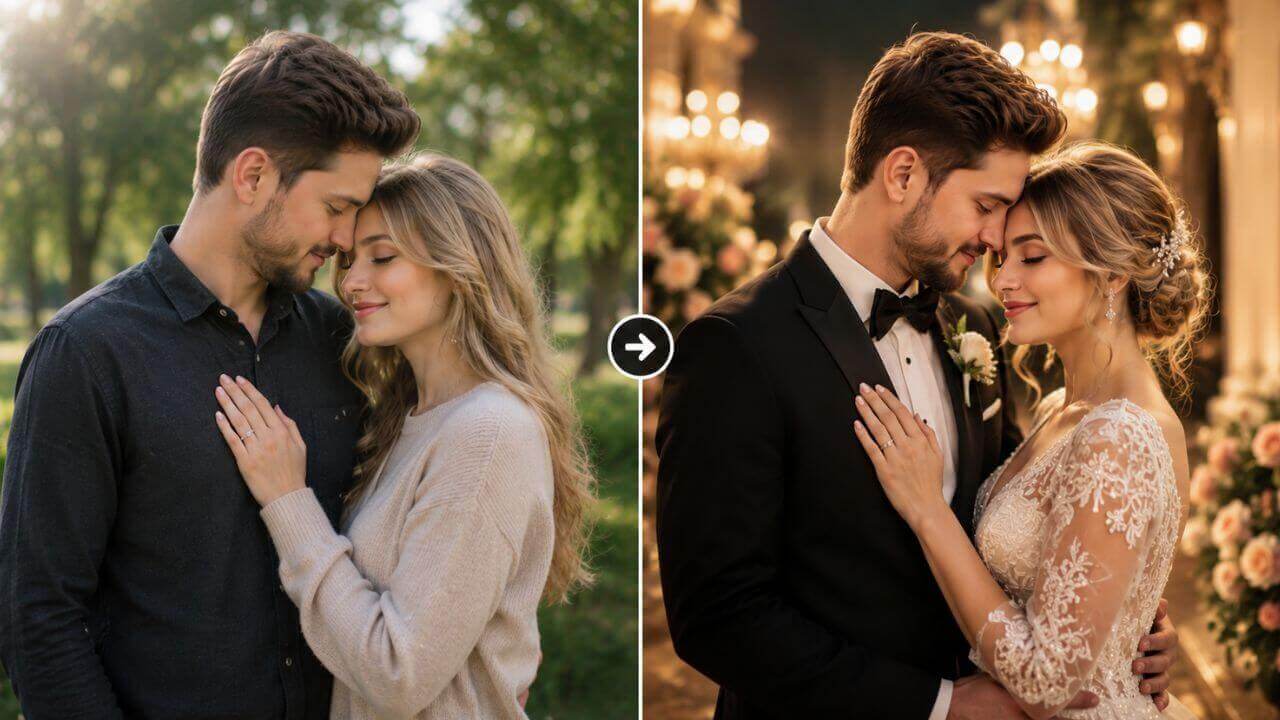
Upload one photo of yourself and one of your partner. The AI keeps each person's face, skin tone and hairstyle, then composes the two of you together as a real couple instead of pasting two cut-outs side by side.
Upload two ordinary selfies — one of you and one of your partner — and get a realistic couple or wedding photo in seconds. Pick from 30 romantic scenes such as Church Wedding, Castle Wedding, Beach Walk or Chinese Wedding, or upload a reference couple photo to copy its pose and outfits, while both faces stay exactly the same. No sign-up, no watermark and no studio needed.
Drag & drop your selfie here
or browse files — JPG, PNG, WEBP • max 10MB
No image? Try this example:
Drag & drop your partner's selfie here
or browse files — JPG, PNG, WEBP • max 10MB
No image? Try this example:
Pick one scene or upload a reference couple photo below — the two are mutually exclusive.
Drag & drop a couple photo here
or browse files — the AI matches its pose, outfits & scene
No image? Try one of these examples:
Your instruction is added on top of the scene or reference photo you picked.
By using this tool you agree to our Terms of Service and Privacy Policy.
Your wedding photo will appear here
Upload both selfies, pick a scene or a reference photo, then click Generate Wedding Photo.
Generating your wedding photo…
This usually takes 10–60 seconds. Please keep this page open.
Oops, something went wrong
 AI Clothes Changer
 AI Outfit Changer
 AI Lingerie Try-On
 AI Xray Clothes
 AI Virtual Model Generator
 AI Pose Generator
 AI Image Generator
 AI Image Editor
 AI Body Modifier
 AI Baby Generator
 AI Age Changer
 AI Pregnant Generator
 AI Gender Swap
 AI Object Remover
 AI Watermark Remover
 AI Background Remover
 AI Background Changer
 AI Photo Restoration
 AI Image Extender
 AI Image Enhancer
 AI Image Upscaler
 AI Image Style Converter
 AI Sticker Generator
 AI Headshot Generator
An AI couple wedding photo generator turns two ordinary selfies into a realistic couple or wedding photo — in any scene you like — while keeping both faces exactly as they are.
Upload one photo of yourself and one of your partner. The AI keeps each person's face, skin tone and hairstyle, then composes the two of you together as a real couple instead of pasting two cut-outs side by side.
Two clear, well-lit selfies where each face is visible and facing the camera. Optionally add a third reference couple photo whose pose, outfits and scene you want the AI to follow.
Pick one of 30 scenes — Church Wedding, Castle Wedding, Beach Walk, Paris Love, Chinese Wedding, Tropical Honeymoon and more — plus an output size. The scene and the reference photo are mutually exclusive.
A photorealistic wedding or couple portrait generated online in 10–60 seconds, including outfits, lighting, expressions and background. Preview it, try another scene and download it free with no watermark.
One free AI wedding photo generator in your browser — create romantic couple portraits from two selfies and download them at zero cost.
Both faces are taken from your own photos, so the result still looks like you and your partner. The AI blends expressions, skin tones and lighting into one natural photograph.
Church Wedding, Castle Wedding, Vintage Wedding, Chinese Wedding, Shrine Wedding, Beach Walk, Paris Love, Tropical Honeymoon, Christmas Eve and many more, each with its own outfit styling.
Upload a reference couple photo and the AI follows its pose, composition, outfits and scene, while still putting your own faces on the two people.
Add your own note such as "a bride in a lace wedding dress holding a bouquet" or "warm golden-hour light with soft bokeh" and it is added to the scene instruction.
Create square, portrait or widescreen wedding photos with presets from 512x512 and 1024x1024 to 16:9, 9:16, 4:3, 3:4, 3:2 and 2:3.
Use this free AI couple wedding photo generator without an account, download clean images with no watermark, and get even more daily generations as a member or VIP.
Create a wedding photo in four simple steps. No photographer, no studio and no account needed — just upload and download.
Add one clear, well-lit photo of yourself and one of your partner, each showing a single face looking at the camera.
Choose one of 30 romantic scenes, from Church Wedding and Castle Wedding to Beach Walk and Chinese Wedding — or upload a reference couple photo instead.
Select an output size such as 1:1, 16:9 or 9:16, and add any extra detail in the optional custom prompt box.
Click Generate Wedding Photo, preview the AI result and download it instantly with no watermark — then reuse it as a reference for another scene.
From wedding planning to anniversary gifts, here is how couples and creators use AI wedding photos.
See yourselves in a church, castle or garden ceremony before booking a venue, so you know which style fits you both.
Two selfies from two different cities are enough to create a believable photo of the two of you together in a romantic scene.
Turn an ordinary selfie into a Paris Love or Autumn Leaves portrait and print it as a personal gift or card.
Generate several scenes and sizes to find the perfect save-the-date, announcement or social post image.
Show how a gown, suit or venue reads in a real ceremony setting without organising a full styled shoot.
Try Chinese Wedding, Shrine Wedding, Golden Temple, Vintage Wedding and more to explore traditions before the big day.
Couples, photographers and wedding planners use this free AI couple wedding photo generator to preview looks and create romantic portraits.
“We used it to preview wedding themes before booking a venue. The church and castle scenes looked like real photos of us, and the faces were spot on.”
“I use it for mood boards with clients. Uploading a reference couple photo and matching that composition saves an entire shoot day.”
“My partner and I are long distance, so we made anniversary photos from two selfies. The lighting and outfits looked completely natural.”
“Couples can finally see themselves in a venue before committing. Chinese Wedding and Garden Romance are the two scenes my clients ask for most.”
“I show brides how a gown reads in a real ceremony setting instead of on a hanger. Results look like a styled engagement shoot.”
“Thirty scenes is a lot of variety. I made a Paris Love and a Beach Walk print for our anniversary and both were ready in under a minute.”
Answers to the most common questions about our free online AI couple wedding photo generator.
It is an online tool that turns two ordinary selfies into a realistic couple or wedding photo. Upload one photo of yourself and one of your partner, choose a wedding scene such as Church Wedding, Beach Walk or Chinese Wedding, and the AI renders a professional-looking portrait in seconds - no studio, no photographer and no Photoshop.
The AI reads both faces, keeps each person's identity, skin tone and hairstyle, then places the two of you together in the scene you picked. It generates the pose, outfits, lighting, depth of field and background as one cohesive photograph instead of pasting two cut-outs together.
Yes. Your exact faces, facial features, hairstyles and skin tones are preserved from the two uploaded photos. Both people are shown facing the camera with faces fully visible, so the result still looks like the same couple rather than a generic AI pair.
Two photos are required - one with your face and one with your partner's face. Each photo should show a single person, clearly lit and facing the camera, for the best identity match.
There are 30 scenes, including Romantic Sunset, Paris Love, Beach Walk, Church Wedding, Castle Wedding, Vintage Wedding, Chinese Wedding, Shrine Wedding, Tropical Honeymoon and Christmas Eve. Each scene comes with its own styling and outfit direction, so the result matches the mood you choose.
You can upload a third photo of a couple whose pose, outfits and scene you want to copy. The AI then follows that composition and clothing while keeping your own faces. The reference photo and the scene selection are mutually exclusive - pick one or the other.
Yes. Use the optional custom prompt box to describe what you want, for example "a bride in a lace wedding dress holding a bouquet inside a church" or "warm golden-hour light with a soft bokeh background", and it is added to the scene instruction.
You can upload JPG, PNG or WEBP images up to 10MB each. Output is available in eight presets from 512x512 to 1024x1024, plus 16:9, 9:16, 4:3, 3:4, 3:2 and 2:3, so you can create square, portrait or widescreen wedding photos.
Most photos finish in 10 to 60 seconds depending on image size and queue load. Keep the page open while the result is being generated.
Yes, it is free and works without an account, and downloads carry no watermark. A free member account raises your daily generations, and VIP adds unlimited daily use and advanced models. You may use results for personal and commercial projects, provided you own the rights to the uploaded photos and your use complies with our Terms of Service.
