
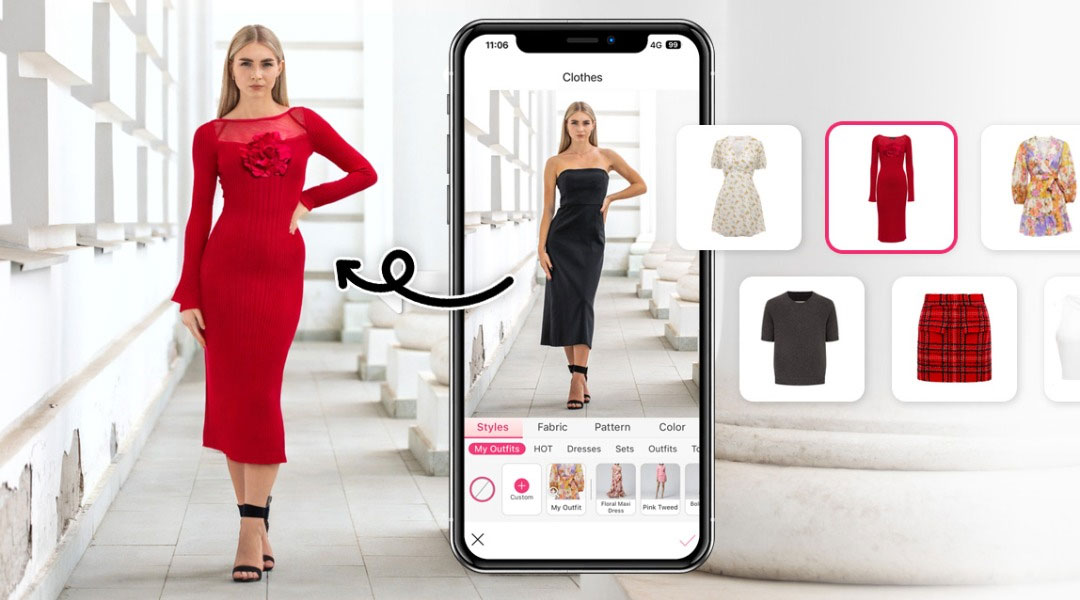
What Is AI Virtual Try-On?
AI virtual try-on is a virtual fitting room that puts a garment onto your own photo. You provide a picture of yourself and the outfit you want to preview, and the AI drapes the clothing over your body while keeping your face, pose, skin tone and background unchanged. The result reads like a photo of you wearing that piece — not a generic mannequin render.
This solves the biggest blind spot in online shopping: product pages show a model, not you. A quick preview helps you decide between two colors, check whether a maxi dress will be too long, or see if a structured blazer suits your build. It is also useful for stylists, resellers and content creators who need to show looks quickly without organizing a shoot.
Core Features of the AI Virtual Try-On Tool
Your Photo Stays Your Photo
Face, expression, body shape and background are preserved, so the preview looks like a real picture of you.
Judge Length and Silhouette
Compare hemlines, sleeve lengths and loose versus fitted cuts on your own proportions before ordering.
Compare Colors Side by Side
Preview two or three colorways on the same photo to see which one flatters your skin tone and styling.
Tops, Dresses, Suits and More
Preview casual tops, formal shirts, jackets, dresses, suits and traditional outfits in the same workflow.
Free and Watermark-Free
No subscription, no watermark and no sign-up — previews are ready to save and share immediately.
Results in Seconds
One upload and one click deliver a preview in seconds, so comparing several outfits stays quick.
How to Use AI Virtual Try-On (Step by Step)
You only need a photo of yourself and the outfit you are curious about:
- Open the try-on tool. Go to the AI virtual try-on page.
- Upload your photo. Use a clear picture where your upper body or full body is visible.
- Add the outfit. Upload a product image of the garment or describe the style you want to preview.
- Generate the preview. The AI fits the outfit to your body and lighting.
- Compare and download. Try other colors or cuts, then download the version you prefer.
Pro Tips for a Convincing Virtual Try-On
Small choices in the source photos make a big difference in realism:
- Stand straight and face the camera. A frontal shot with relaxed arms gives the AI clean body contours to work with.
- Avoid thick outerwear in the original photo. A simple top produces a cleaner base than a bulky coat.
- Use a product image on a plain background. Clean garment cutouts transfer far more accurately than busy catalog collages.
- Match the lighting mood. If your photo is warm evening light, expect the preview to inherit that tone — that is what keeps it believable.
- Treat the preview as a styling check. Use it to compare silhouette and color, then confirm exact measurements on the product page.
If you mainly want to swap one piece of clothing, the AI clothes changer is the lighter option, and the AI outfit changer is built for full look swaps. Read the clothes changer guide for more outfit workflows.
Frequently Asked Questions (FAQ)
Is the AI virtual try-on free?
Yes. The virtual try-on on AIDoImg is 100% free, with no watermark, no credit card and no account required.
Do I need a photo of the outfit as well as my own photo?
For the most accurate result, upload your own photo plus a clear product image of the garment. You can also describe the outfit in words if you only want a general style preview.
Will it show the true fit and size?
The preview is a visual fit guide, not a measurement. It shows how the silhouette, length and color read on your body, which helps you judge loose versus fitted cuts and short versus long hemlines.
Does virtual try-on work for dresses, suits and traditional wear?
Yes. It handles tops, shirts, jackets, dresses, suits and traditional outfits, and it keeps your face, pose and background exactly as they are in your photo.
Can I use my own photo taken with a phone?
Yes. A normal phone photo works well. Choose one with even lighting where the outfit area is clearly visible, and avoid heavy shadows or extreme angles.
Is my photo kept private?
Your photos are used only to generate the preview you asked for. They are not shared publicly and no result is added to a gallery.
