
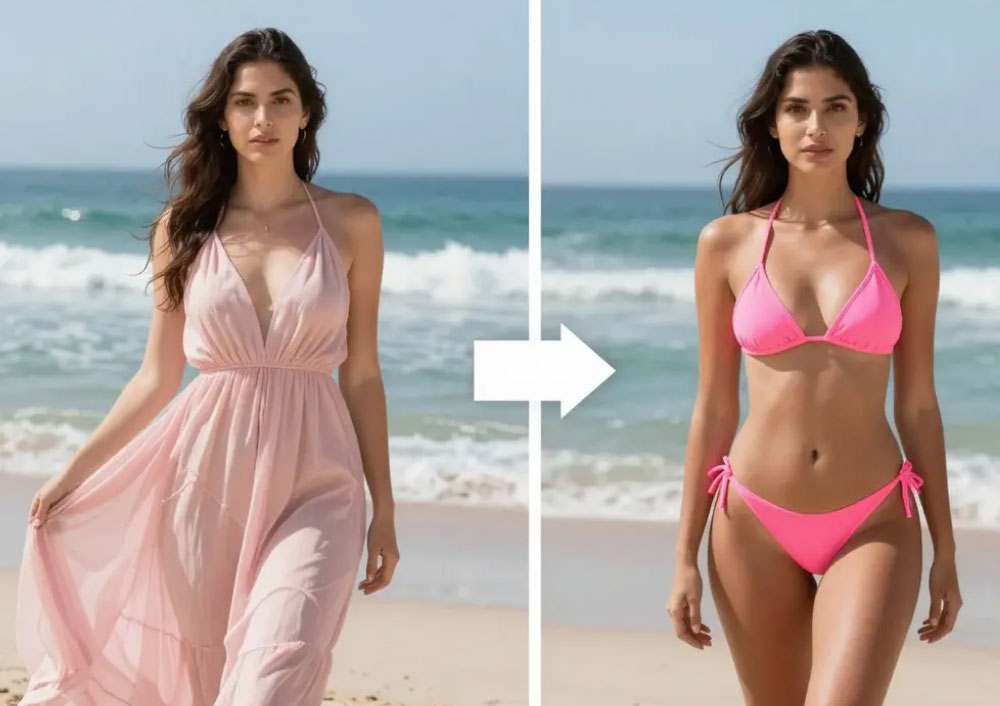
What Is an AI Bikini Generator?
It is a focused swimwear preview tool. You upload a photo of yourself, describe the swimsuit you are considering, and the AI renders that piece onto your body while keeping your face, pose, hair and background intact. The output looks like a real photo of you in that swimsuit rather than a generic catalog image.
That makes it genuinely useful for shopping. Bikini sizing charts rarely explain how a cut will sit on your frame, and color looks different on every screen. A quick preview answers the practical questions — is the coverage right, does the color suit my skin tone, is the cut flattering — before you spend money and wait for a return label.
Core Features of the AI Bikini Generator
Preview on Your Own Photo
Your face, body shape and pose stay unchanged, so the preview reflects how the swimsuit actually reads on you.
Compare Colors and Cuts
Render the same style in several colors, or switch between high-waisted, triangle and one-piece cuts.
Keeps the Scene Intact
The beach, pool or studio background stays exactly as it was, with matching light and shadows on the fabric.
Seconds per Preview
Upload, describe, generate and download in under a minute, so trying several options stays effortless.
Private by Default
Photos are used only for the preview you requested and are never published to a public gallery.
Free and Watermark-Free
No cost, no watermark and no sign-up, so personal previews stay simple and unlimited.
How to Use the AI Bikini Generator (Step by Step)
A preview takes about a minute from start to download:
- Open the generator. Go to the AI bikini generator page.
- Upload your photo. Choose a well-lit picture where your body is clearly visible and not hidden behind objects.
- Describe the swimsuit. Include the cut and color you want, for example a black high-waisted two-piece.
- Generate the preview. The AI fits the swimsuit to your pose and the light in the photo.
- Compare and download. Repeat with other colors or cuts, then save the previews you like.
Pro Tips for Better Swimwear Previews
These details make a visible difference in realism:
- Start with a clear, flattering photo. Good light and a straight posture give the AI accurate contours to work with.
- Compare one variable at a time. Keep the cut fixed while testing colors, then keep the color fixed while testing cuts.
- Describe fabric details. Words like ribbed, shiny or matte help the render match the product you are eyeing.
- Use previews for styling, not sizing. Confirm exact measurements on the retailer page before ordering.
- Only use photos you have the right to use. For anyone other than yourself, get clear permission first.
Want a broader wardrobe preview? The AI lingerie try-on covers intimate apparel, and the AI virtual try-on handles everyday outfits. See the lingerie try-on guide for more fitting tips.
Frequently Asked Questions (FAQ)
Is the AI bikini generator free?
Yes. The tool is free to use on AIDoImg with no watermark, no subscription and no account required.
Do I need my own photo?
Yes. Upload a photo of yourself so the AI can match your pose, skin tone and lighting. Only use photos of other people if you have their permission.
Can I choose the swimsuit style and color?
Yes. Describe the style you want to preview, such as a high-waisted bikini in emerald green or a one-piece in navy, and the AI generates that look.
Will the preview show realistic fabric and fit?
The AI matches the swimsuit to your body contours and the light in your photo, so straps, seams and fabric sheen read naturally. Treat it as a styling preview rather than a size measurement.
Is my photo private?
Yes. Your image is processed only to create the preview you requested. It is not published, shared or added to any gallery.
Can I download the result without a watermark?
Yes. Every generated preview is completely watermark-free and ready to save for personal comparison.
